Download all Joomla templates including quickstart (demo)only $29
👋 All our products will be compatible with Joomla 6 😎

Forum

Important - Hands Up!

- Please ask using the account with which you made the purchase or download of our products and in its respective category.
- If you bought our products in another market, ask your questions in that market, not here.

* ADD PRODUCT NAME IN START OF SUBJET

Facebook doesn’t load the article’s image

  • B
  • BZsolt New Member
  • Topic Author 1 month 4 days ago #1
If I share a link to an article on Facebook, the article’s image doesn’t appear. What could be the problem?

Please Log in or Create an account to join the conversation.
  • L
  • leoalv Moderator
  • 1 month 4 days ago #2
Hello.
Go to System >> Site Template Styles >> ut_NAME - STYLE THAT YOU ARE USING >> Template Option (green button) >> Blog >> Details >> and enable Open Graph.
Regards
The following user(s) said Thank You: BZsolt

Please Log in or Create an account to join the conversation.

  • B
  • BZsolt New Member
  • Topic Author 1 month 4 days ago #3
I checked. It is set to enabled.

Please Log in or Create an account to join the conversation.

  • L
  • leoalv Moderator
  • 1 month 4 days ago #4
If the problem persists, send us the URL as confidential information, and we will verify it.
The following user(s) said Thank You: BZsolt

Please Log in or Create an account to join the conversation.

  • B
  • BZsolt New Member
  • Topic Author 1 month 2 days ago #5
None of the articles display an image when I share the link on Facebook. It only works if I first put each one into the Facebook Debugger.

www.kingofpop.hu/index.php/legfrissebb-h...es-jaafar-jacksonnal

Please Log in or Create an account to join the conversation.

  • L
  • leoalv Moderator
  • 1 month 2 days ago #6
The article in the link you shared won't share an image because it's a video, so it doesn't have an image to embed.

Please Log in or Create an account to join the conversation.

  • L
  • leoalv Moderator
  • 1 month 2 days ago #7
I also see that you have two Open Graphs, one that must be a plugin, and one that comes with the template (but this one seems to be modified because the image path is relative when in our template it is absolute, precisely so that it can be shared).
The following user(s) said Thank You: BZsolt

Please Log in or Create an account to join the conversation.

  • L
  • leoalv Moderator
  • 1 month 2 days ago #8
We tested sharing the following article, and it does share with its image: www.kingofpop.hu/index.php/legfrissebb-h...az-amerikai-mozikban , because it's an article that has an image in the Open Graph cards.

Regards
The following user(s) said Thank You: BZsolt

Please Log in or Create an account to join the conversation.

  • B
  • BZsolt New Member
  • Topic Author 3 weeks 4 days ago #9

Please Log in or Create an account to join the conversation.

  • L
  • leoalv Moderator
  • 3 weeks 4 days ago #10
What's wrong with this link? Or what do you want us to analyze?

Please Log in or Create an account to join the conversation.

  • B
  • BZsolt New Member
  • Topic Author 3 weeks 4 days ago #11
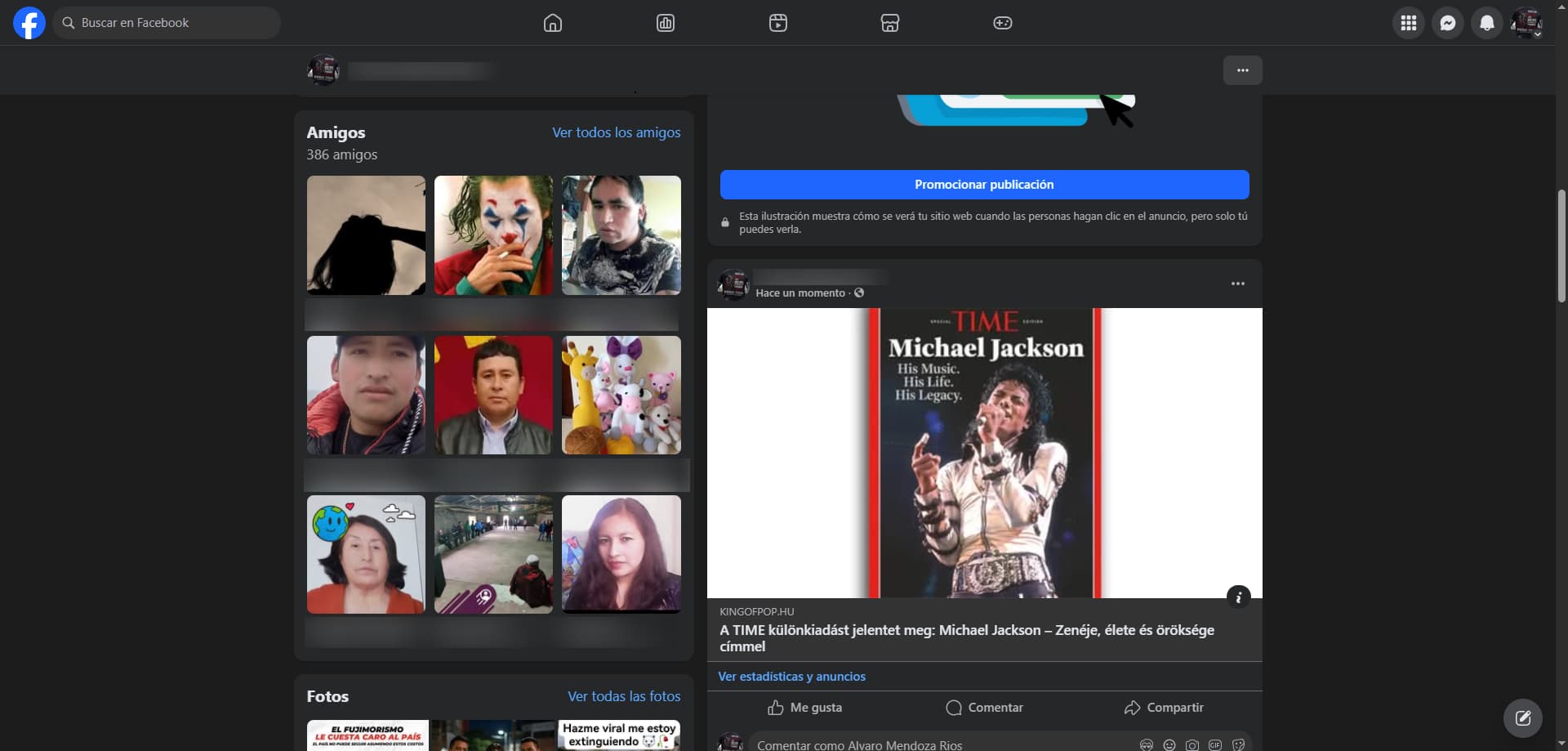
Facebook doesn’t load the article’s image

Please Log in or Create an account to join the conversation.

  • L
  • leoalv Moderator
  • 3 weeks 4 days ago #12
Here's proof that it does share. You can also view the source code with Ctrl+U and then search for og:image, although it currently has two, but it works. As I mentioned in my previous response, it has two OpenGraph files, and I don't know where they came from; the template only comes with one. But it works.
 

Regards
The following user(s) said Thank You: BZsolt

Please Log in or Create an account to join the conversation.

78,095+
Happy customers guarantee our Templates and Extensions