Forum
- Home
- Forum
- Template Support
- Premium Joomla Templates
- Agencio - Dark mode not functioning
Important - Hands Up!
- Please ask using the account with which you made the purchase or download of our products and in its respective category.
- If you bought our products in another market, ask your questions in that market, not here.
* ADD PRODUCT NAME IN START OF SUBJET
Agencio - Dark mode not functioning
- Q
- QliQ New Member
- Topic Author 2 weeks 2 days ago #1
Hello,
Although the Agencio Template page shows a dark mode with black background, the demo has a white background in both Home 1 and Home 2 pages.
demo.unitemplates.com/agencio/index.php
demo.unitemplates.com/agencio/index.php/home-2
The same happens on a Joomla 6 quickstart I have installed on our server.Â
Kind regards,
Although the Agencio Template page shows a dark mode with black background, the demo has a white background in both Home 1 and Home 2 pages.
demo.unitemplates.com/agencio/index.php
demo.unitemplates.com/agencio/index.php/home-2
The same happens on a Joomla 6 quickstart I have installed on our server.Â
Kind regards,
Please Log in or Create an account to join the conversation.
- L
- leoalv Moderator
- 2 weeks 2 days ago #2
Hi.
Why do you say it's not working? How did you expect it to work?
How does Dark Mode actually work?
Our dark mode detects your operating system's theme and will display the color you have activated as long as your browser is inheriting or has the same color selected as the operating system. But if, for example, your operating system has dark mode activated but your browser has light mode activated, then our template will display in light (white) mode; because in this case, JavaScript detects your preference as light (white). That's how the technology works; we can't change it.
There's also manual mode.
Perhaps your operating system and browser are in dark mode, but the template is displayed in light (white) mode. This is because you activated that mode by clicking the toggle button. This means you selected white mode, and again, the technology respects your selection.
So in summary: if your operating system is in Light mode, the template will be white; if your browser is in Light mode, the template will be white; or if you clicked the Light mode switch, it will also be Light, because the script respects your selection in that order.
Regards
Why do you say it's not working? How did you expect it to work?
How does Dark Mode actually work?
Our dark mode detects your operating system's theme and will display the color you have activated as long as your browser is inheriting or has the same color selected as the operating system. But if, for example, your operating system has dark mode activated but your browser has light mode activated, then our template will display in light (white) mode; because in this case, JavaScript detects your preference as light (white). That's how the technology works; we can't change it.
There's also manual mode.
Perhaps your operating system and browser are in dark mode, but the template is displayed in light (white) mode. This is because you activated that mode by clicking the toggle button. This means you selected white mode, and again, the technology respects your selection.
So in summary: if your operating system is in Light mode, the template will be white; if your browser is in Light mode, the template will be white; or if you clicked the Light mode switch, it will also be Light, because the script respects your selection in that order.
Regards
Please Log in or Create an account to join the conversation.
- Q
- QliQ New Member
- Topic Author 2 weeks 2 days ago #3
Thank you for the reply,
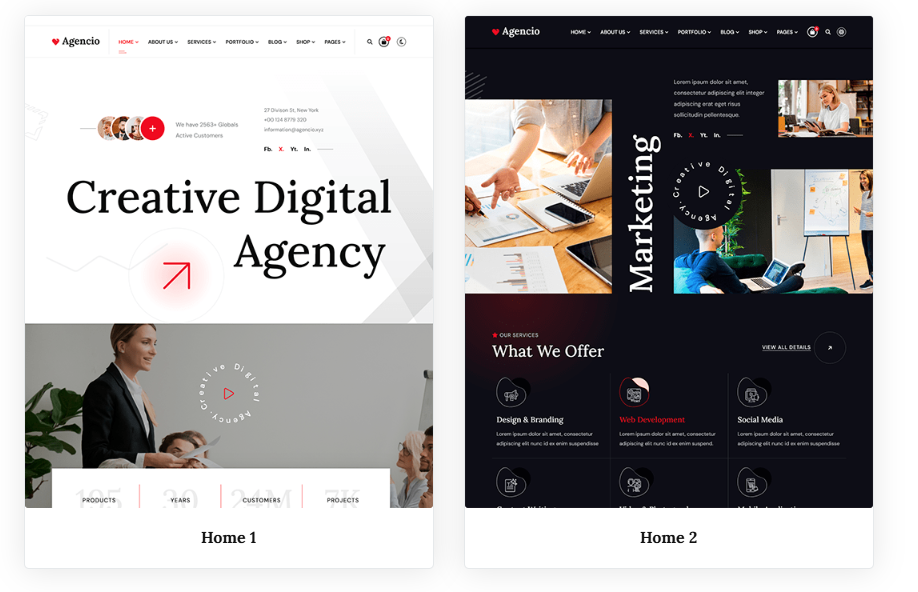
When somenone visits the Agencio demo -Â www.unitemplates.com/joomla-templates/agencio - they see this:
Â
So I see an image with two distinct page styles with two different links to two different pages with two different backgrounds - light and dark.
Therefore, I got the impression that the background is not simply user selectable but that it can be permanently set from the admin by selecting the Default or the Home 2 Styles.
My apologies for my misunderstanding.
Kind regards.
When somenone visits the Agencio demo -Â www.unitemplates.com/joomla-templates/agencio - they see this:
Â
So I see an image with two distinct page styles with two different links to two different pages with two different backgrounds - light and dark.
Therefore, I got the impression that the background is not simply user selectable but that it can be permanently set from the admin by selecting the Default or the Home 2 Styles.
My apologies for my misunderstanding.
Kind regards.
Please Log in or Create an account to join the conversation.
- L
- leoalv Moderator
- 2 weeks 1 day ago #4
Hello.
Light and dark modes are designed to reflect user preferences. If a light and dark mode exists, you can force it to be permanent.
To force it, go to your template style settings and disable the Dark Mode option. Then, edit index.php, find the <html> tag, and add the class attribute so that the beginning looks like this: <html class="dark-mode"
This will permanently enable dark mode, and it will only inherit the primary color from your preset or custom style.
Another way to have dark mode without editing index.php is to edit your preset or custom style, selecting a dark background color and light text for the body, top bar, headers, and footer. In this case, remember to enable SCSS to CSS compilation.
Light and dark modes are designed to reflect user preferences. If a light and dark mode exists, you can force it to be permanent.
To force it, go to your template style settings and disable the Dark Mode option. Then, edit index.php, find the <html> tag, and add the class attribute so that the beginning looks like this: <html class="dark-mode"
This will permanently enable dark mode, and it will only inherit the primary color from your preset or custom style.
Another way to have dark mode without editing index.php is to edit your preset or custom style, selecting a dark background color and light text for the body, top bar, headers, and footer. In this case, remember to enable SCSS to CSS compilation.
Please Log in or Create an account to join the conversation.
- Q
- QliQ New Member
- Topic Author 2 weeks 1 day ago #5
Thank you very much for your feedback and support.
Kind regards,
Kind regards,
Please Log in or Create an account to join the conversation.
Secure Payment
Use your cards with Paypal.
Â
Â
Â
Â
Â
Â
Â
Â